Detect known disposable Gmail and Outlook addresses with address-level evidence. Learn why domain blocklists miss them and how to read IronDome API results.
To detect a known disposable Gmail or Outlook address, check evidence about the full email address. A domain-only blocklist cannot distinguish a temporary inbox from an ordinary account on the same provider. Blocking gmail.com or outlook.com would reject legitimate users too.
This is one of the problems I described in Introducing IronDome. A known listing can support a signup decision. An address missing from the data is still an unknown, not proof of a permanent or private inbox.
Why domain blocklists miss shared-provider temporary inboxes
Temporary access does not require an unusual domain. For example, Emailnator describes a service that provides Gmail addresses and exposes their messages through a public inbox. That is the service's description of its product, not a claim that all Gmail addresses work that way.
IronDome's published classification comparison also includes disposable Gmail and Outlook cases. It is a curated test, not an estimate of how common those addresses are among your users.
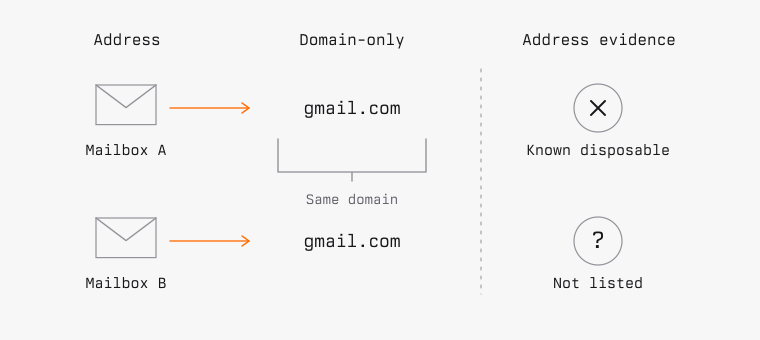
Consider two synthetic Gmail addresses. One belongs to a regular user. The other is a known address offered by a temporary-inbox service. A domain-only check receives the same input for both:
address A -> gmail.com
address B -> gmail.com
No amount of refreshing a domain-only list can make that input distinguish the two. The detector needs evidence about the address, or another signal that actually separates the cases.
Gmail aliases and plus addressing do not prove disposability
Dots and plus tags do not make an address disposable. Google supports them for legitimate mailbox use. Outlook.com also supports site-specific plus addresses.
An address ending in +shopping may simply help its owner organize receipts. A string that looks random may also belong to a real user. Rejecting either pattern as disposable substitutes a guess for evidence.
Alias matching answers whether supported address variants refer to the same mailbox. Disposable-email detection answers whether an address or domain is known to be associated with disposable service use. If the concern is repeated trials from aliases, use an alias-aware ownership or entitlement policy alongside screening. The GATES email-matching guide explains the provider-specific matching rules.
DNS checks answer another question. Finding a mail server for a domain does not tell us who can read one mailbox, whether it is public, or whether it is being used temporarily. Email verification demonstrates access to the delivered message at that moment. A temporary inbox may receive that message too.
Read the IronDome API result without treating it as identity proof
The IronDome disposable email detection API accepts the full email address. Read disposable for the classification and reason for its explanation. blocked_email means a normalized address matched a blocked address; blocked_domain means the domain or a parent domain matched a blocked domain.
A successful response with disposable: false and reason: not_listed means no matching rule was found. The separate allowed_domain reason means the domain matched an allowed domain. Keep these explanations distinct when investigating a decision.
Neither negative result proves that the mailbox is permanent, private, deliverable, or controlled by a new person. The valid field is about accepted email syntax, not confirmed mailbox existence. A detection dataset can miss an address it has not observed, and classifications can need correction.
Keep these states separate in your application:
- Confirmed disposable: the check returned a disposable classification.
- Not classified as disposable: the check completed with
disposable: false. The reason may benot_listedorallowed_domain. - Unavailable: a timeout, quota error, network failure, or unusable response prevented a decision.
Do not turn the last state into disposable: false in your logs. You may choose to continue signup during an outage, but you should be able to see that screening did not complete.
Test disposable-email coverage and false positives
Build an evaluation set with labels you can justify: known disposable domains, known temporary addresses on shared providers, ordinary provider addresses, and legitimate aliases. Include negative examples so you can measure false positives rather than just counting blocked addresses.
Use synthetic addresses for control-flow tests. For detection evaluation, use addresses you are authorized to test and record why each label is credible. Do not open other people's inboxes or collect their messages to build a test set.
A provider name or a large list size is not a coverage measurement. Record the results for each category and keep uncertain labels separate. Repeat the evaluation when the detector or data changes.
For a signup policy that rejects disposable addresses, perform the check on the server before account creation, verification mail, or trial grants. The Node.js signup tutorial shows that ordering and tests failure paths. Continue normal ownership verification and abuse controls afterward. Address-level detection closes a gap in domain-only screening; it does not make an email address a complete identity check.
Detect disposable Gmail and Outlook addresses
Engineering
Yogesh Pandar